SatisfactorySatisfactory

How to install mods on my Satisfactory server

Back

How to install mods on my Satisfactory server

Join the discord

To install Satisfactory mods on your Nitroserv server, you need FTP access that you can create from your server management in the "FTP Access" tab and the Satisfactory Mod Manager application that you can download here.

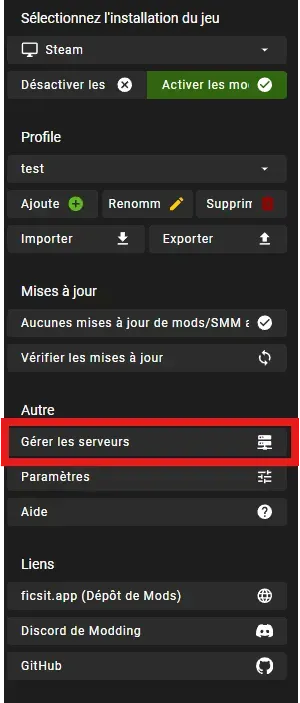
Once on the Satisfactory Mod Manager application, you need to go to the "Manage Servers" tab

672cd6eb60016c3e86297e9d_AD_4nXcjlJtJQVWiCk83_ugBn-7cvqmWTJG1Yz4Qwd8qowahL9AXqoy9ny45IGAtE5ooq1uv8Nx_mlqIqPiwfSNkVrOfXkdtLCYOvqvbXRCxV_5nZ1bY0kpNtOfKxTJakrSX83mJ1vC-.webp

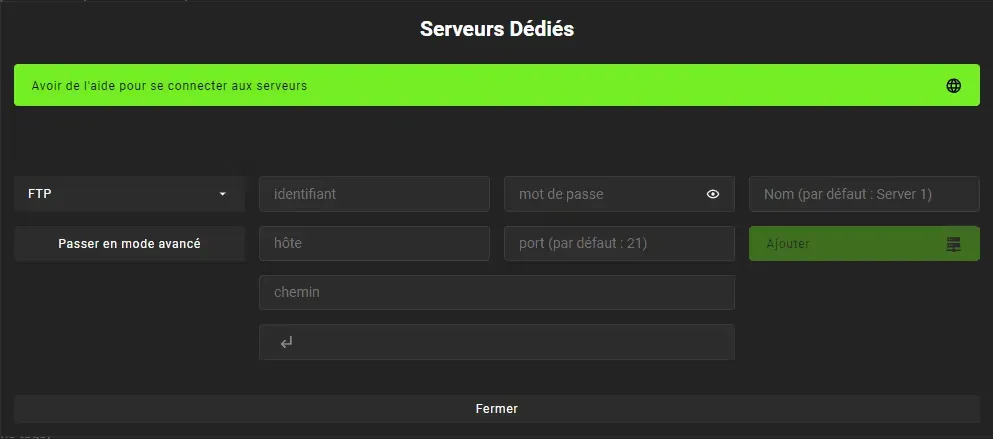
This window will open:


672cd6eb55d8986db1b140eb_AD_4nXf273w85psM0Czf42C8aT3lfZYwti85dJZqKkq-vVji6_hJ87JlkPLm-FAgN5qG1WNnX5_QzH-AZI9ZZCcnERotZzotr20jbW-tXDPWflkWQnMvW1KfJWq09ZdeqJAd4YcXeCIr_w.webp

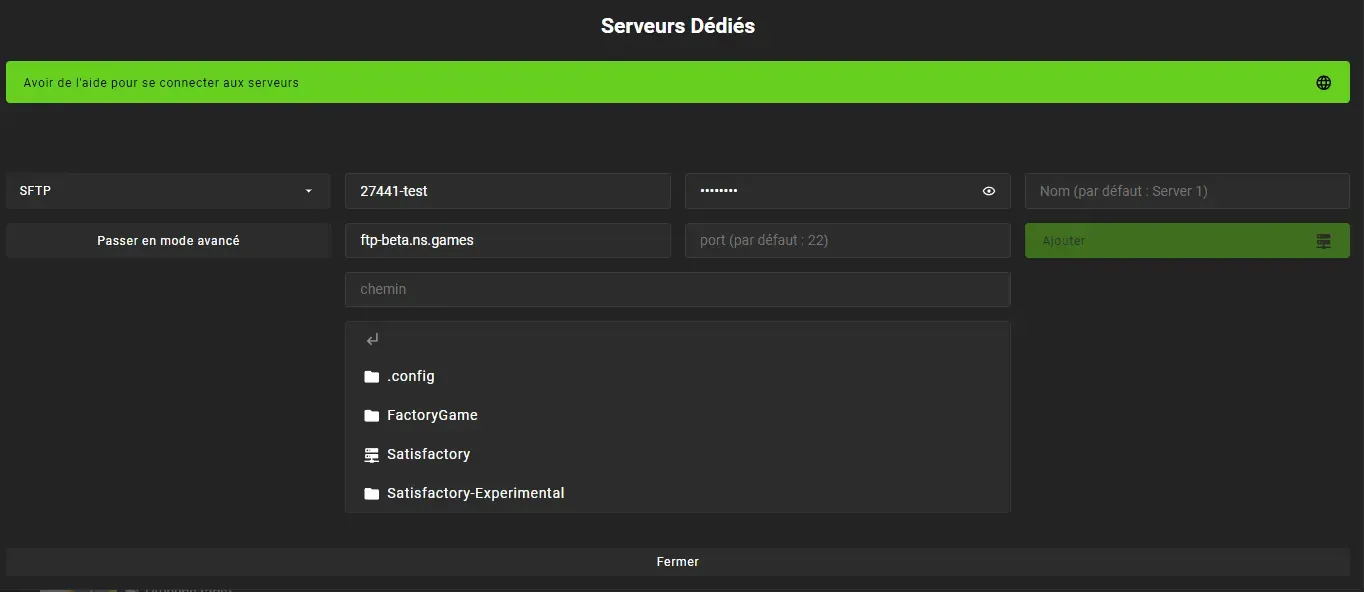
You need to click on FTP and replace it with SFTP.

In the username/password section, these are the credentials of your FTP account created earlier.
In the host field, you need to enter: ftp-beta.ns.games and leave the port empty.

Once these fields are filled, the interface should update, as shown in the screenshot below:
672cd6ebcda2d36fdf2b1ca9_AD_4nXdzredPmNuQ4HpPfAYQEfTHVH8ZTj0-8_SSVCW7So8QP3zrtYst5TsUFDTCyRtmbA-uIFlzhK_cn6ertJYpkEA-kfBdzkgYbFRr_4f7QlMJJGsAYFbs9iSzAwnDgoN8a41k8NkMsg.webp
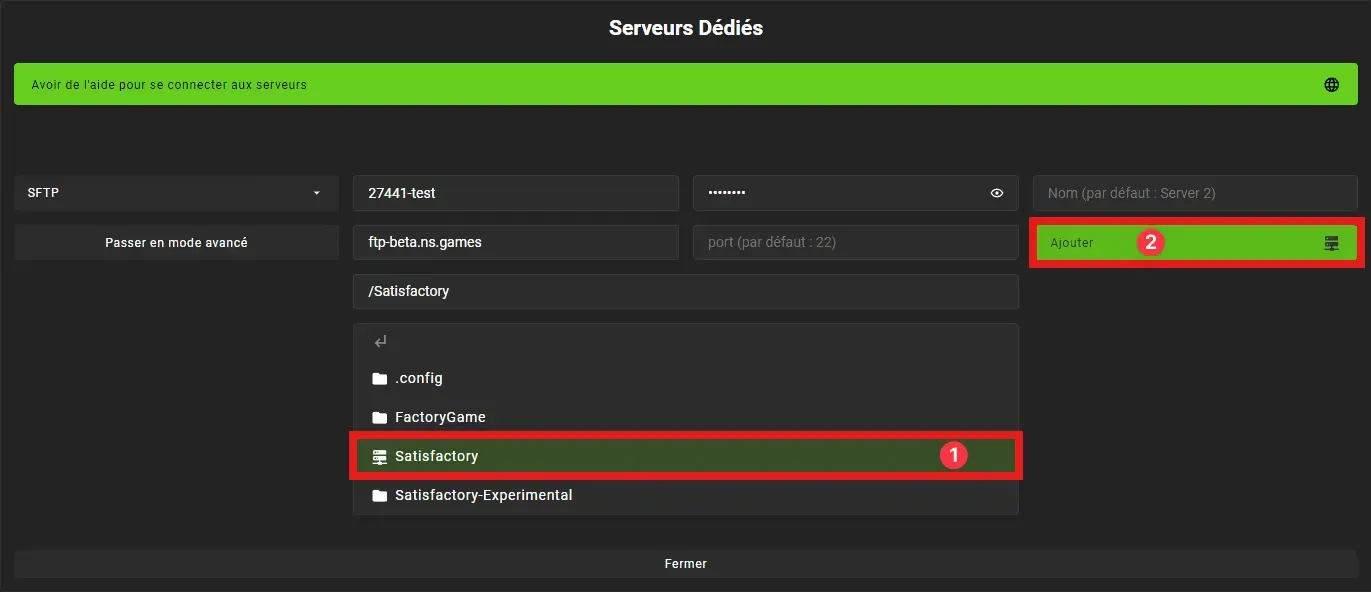
You then need to select Satisfactory (1) then Add (2)
672cd6ebc53088842cff77b6_AD_4nXdaMLWz-FUloHzCnTqGvDswtc4iuTn2fmYbcGskSMM0umJyGe3tKQUoNaKOCYsuCDny_wY06jJ-i0FNxuI47SCqH83yxzEvu7LLHzDRCjRGmUJsPU4MJTCC7ebFcGTpSW11ARdJ8w.webp
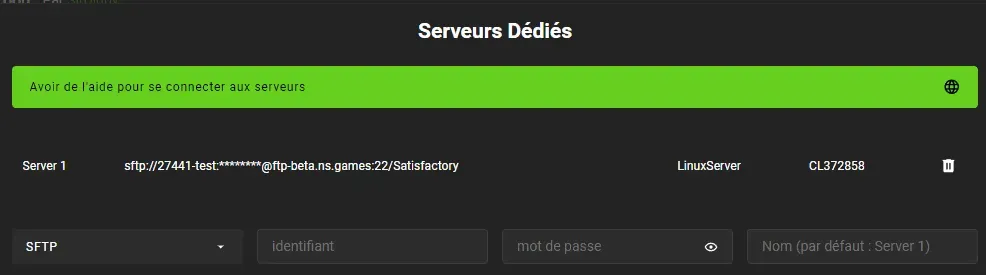
Once done, you will see your server at the top of the page.

Named "Server1", this addition confirms that the server is responding well to Satisfactory Mod Manager.

672cd6ebebdc9edf0f588a9f_AD_4nXcgu-VplAA0tDlxNz1D_tf9XBz8KBhKc2C119s30mg3VEikZBPLJKlnRYv8MzjuK_YsDFenfzO6RTcDcVEUTr4kSWin-LlttDcKNJbq-uZsa7TLZD1gGUCJN-11WYrXISt9jSuH.webp

You can close the dedicated servers window and return to the main menu.
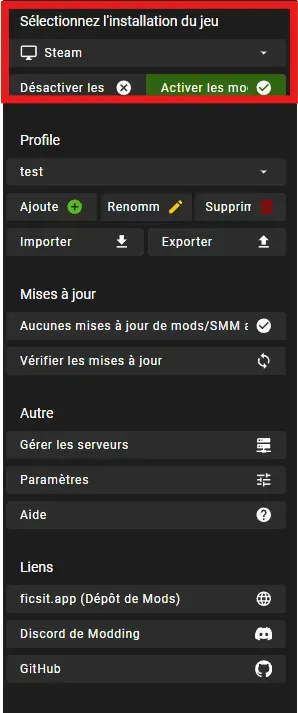
Once on the main menu, you need to change the game installation to that of the server

672cd6ebea93e8c02a7a0abd_AD_4nXdRIQzC2ZwDH_myAtmY3FRCur0YfCKGkZpovhHN0NIjzCcVIoMh9hAoLnrxovaUnBtEJWvHiR__mxXF0BQyqxThVpeaF1iGhGz9-EZb0Q4Ji1FMwP12OZ7M8bgD2XqsE-ALIDcbfw.webp

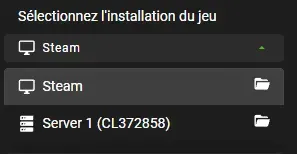
You click on Steam or Epic depending on your installation and select "Server1"

672cd6ebc5b48cb4ee992bec_AD_4nXcjGFBkaYzVbhFeOeutwxybZ9bDHdxGCn5-6aOkM9IDcQBelo4lWmFQ8ERvDZgzEN6WC0nrtC5yPrc47CljzAxEaf74fRAfRR1ittSVb31FMerDZQonZkRjtklXqYINaFWQfkEK.webp

You can now install the mods of your choice on the server.

We remain available in case of any issues, whether on Discord or via a ticket in support.