


 Satisfactory
To add blueprints to the server, you must first create an FTP access. You can follow our guide for FTP here
Then you need to go to the following location: /.config/Epic/FactoryGame/Saved/SaveGames
If you do not see the ".config" folder on FileZilla, you need to display hidden folders.
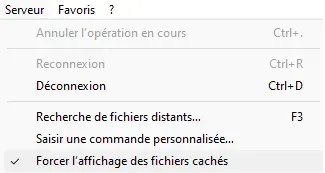
Once in the "SaveGames" folder, you should find a folder called Blueprints. If not, you can create it manually.
In this folder, you need to create a new folder with the name of your save.
⚠ If your world contains accents, this may cause issues. You can rename your save from solo mode.
You can then drag your Blueprints into the newly created folder.
We remain available in case of any issues, whether on Discord or by ticket in support.


