


 Valheim
World modifiers allow you to adapt your Valheim world to your group: more resources, harder combat, less restrictive portals, calmer raids or a lighter death penalty.
In this guide, we explain how to modify them directly in-game from the console, without restarting your server or touching files.
That sounds cool, let me grab my server
Quick answer
World modifiers allow you to change the rules of your Valheim world: combat difficulty, resource rates, portals, death penalty, raid frequency, etc.
To change them directly in-game:
- make sure your SteamID64 is present in
adminlist.txt; - join your Valheim server;
- press F5 to open the console;
- type
devcommands; - apply the desired setting with
setworldmodifier parameter value
For example, to double resources: setworldmodifier resources muchmore
Before you start
To modify world modifiers from the game, you must be a server administrator.
Your SteamID64 must therefore be present in the adminlist.txt file.
If you want to do it via the nitroserv Manager, just click on the Configuration tab and paste it there:
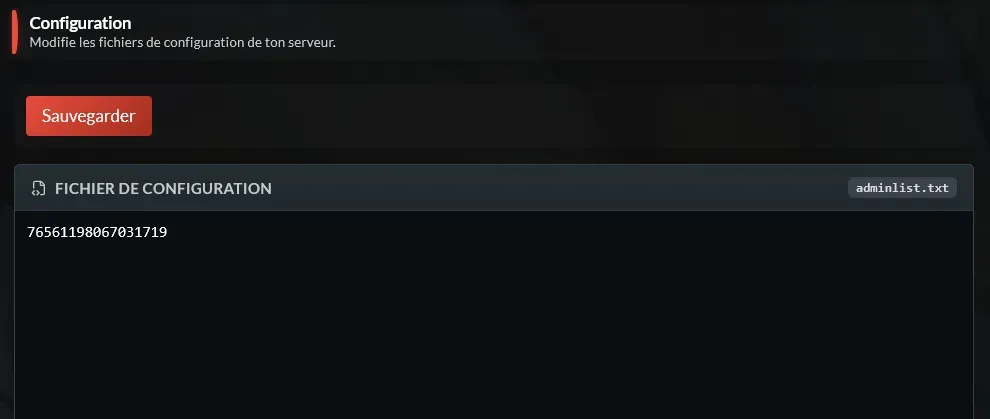
If you don't know your SteamID64, the easiest way is to go to https://steamid.io/ and type your username: the site will give you all the related information 🙌
Once added, restart the server to make sure it's been taken into account.
Without this, you'll be able to open the console, but useful commands may not work: talking to a console that ignores you is rarely the best moment of a Valheim evening.
Enable the Valheim console
Once connected to your server:
- press F5;
- the console should open in-game;
- type the following command:
devcommands
Valheim then displays a message indicating that developer commands are enabled.
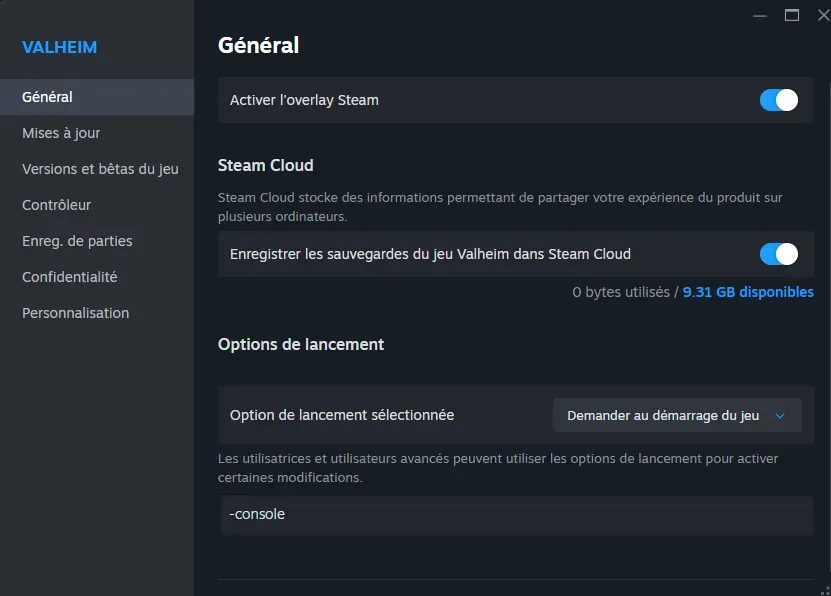
If the F5 key doesn't open the console, check that the console is enabled on the game side.
Right-clicking on Valheim in your Steam list will allow you to select Properties, and at the bottom of the General tab add the following launch option in Valheim's properties: -console
Playing on Xbox: how to open the console?
On Xbox, the developer console isn't as straightforward as on PC, but customer feedback confirmed it can be used with a keyboard.
Before launching commands:
- enable the console display option in Valheim settings on Xbox;
- make sure you're a server administrator;
- connect a USB or compatible keyboard to your Xbox;
- join your server;
- press F5 with the keyboard to open the console;
- then type
devcommands, and apply the desired world modifier, for examplesetworldmodifier raids none
Warning: if you're not a server admin, the console can open, but necessary commands won't work properly. Make sure to add your account to the admin list before testing.
Modify a world modifier
The main command is:
setworldmodifier parameter value
You must replace:
parameterwith the type of setting to modify;valuewith the desired level.
For example, the command setworldmodifier resources muchmore greatly increases the resource rate.
Warning: impossible to reset a single modifier to "normal"
From the F5 console, you cannot reset a single modifier to normal mode with a command like setworldmodifier portals normal: this command simply doesn't work.
The only known way to return to normal values is to reset ALL world modifiers with setworldpreset default.
Warning: this command resets all modifiers defined with
setworldmodifier.
So if you only want to cancel one setting, for example portals, you must note the other modifiers you want to keep, then launch a setworldpreset default, and then reapply the other settings manually.
It's counterintuitive to say the least, but at least now you know before spending fifteen minutes trying normal, default, reset, then cursing an innocent portal.
Summary table of Valheim world modifiers
| Desired effect | Command | Possible values / key | Example |
|---|---|---|---|
| Modify combat difficulty | setworldmodifier combat value |
veryeasy, easy, hard, veryhard |
setworldmodifier combat hard |
| Modify death penalty | setworldmodifier deathpenalty value |
casual, veryeasy, easy, hard, hardcore |
setworldmodifier deathpenalty casual |
| Modify resource rate | setworldmodifier resources value |
muchless, less, more, muchmore, most |
setworldmodifier resources muchmore |
| Modify raid frequency | setworldmodifier raids value |
none, muchless, less, more, muchmore |
setworldmodifier raids none |
| Modify portal rules | setworldmodifier portals value |
casual, hard, veryhard |
setworldmodifier portals casual |
| Build without material cost | setkey nobuildcost | enabled / disabled with removekey nobuildcost | setkey nobuildcost |
| Raids based on each player's progression | setkey playerevents | enabled / disabled with removekey playerevents | setkey playerevents |
| Make enemies passive | setkey passivemobs | enabled / disabled with removekey passivemobs | setkey passivemobs |
| Disable map and minimap | setkey nomap | enabled / disabled with removekey nomap | setkey nomap |
| Enable fire hazards outside Ashlands | setkey fire | enabled / disabled with removekey fire | setkey fire |
Details of different world modifiers
Modify combat difficulty (combat)
To make combat easier: setworldmodifier combat veryeasy or setworldmodifier combat easy
To make combat harder: setworldmodifier combat hard or setworldmodifier combat veryhard
In practice:
| Value | Player damage | Enemy damage | Enemy speed / size | Enemy evolution |
|---|---|---|---|---|
veryeasy |
125% | 50% | 90% | 100% |
easy |
110% | 75% | 90% | 100% |
| normal | 100% | 100% | 100% | 100% |
hard |
85% | 150% | 110% | 120% |
veryhard |
70% | 200% | 120% | 140% |
On
hardandveryhard, enemies also have a higher chance of appearing at high level: the Greydwarf that already disrespects you will do so with more conviction.
Modify death penalty (deathpenalty)
To make death less punitive: setworldmodifier deathpenalty casual or setworldmodifier deathpenalty easy
To make death more severe: setworldmodifier deathpenalty hard or setworldmodifier deathpenalty hardcore
In practice:
| Value | Equipped gear | Inventory | Skill loss |
|---|---|---|---|
casual |
kept | dropped | 1% |
veryeasy |
dropped | dropped | 1% |
easy |
dropped | dropped | 2.5% |
| normal | dropped | dropped | 5% |
hard |
dropped | destroyed | 7.5% |
hardcore |
destroyed | destroyed | 100% |
The most comfortable setting for a server between friends is often setworldmodifier deathpenalty casual: it allows you to keep equipped gear on death while maintaining some punishment. Conversely, hardcore is best reserved for groups that enjoy suffering methodically.
Increase or reduce resource rate (resources)
To increase resources obtained: setworldmodifier resources more
To increase them even more: setworldmodifier resources muchmore
To go to maximum: setworldmodifier resources most
In practice:
| Value | Effect |
|---|---|
muchless |
about x0.5 |
less |
about x0.75 |
| normal | x1 |
more |
about x1.5 |
muchmore |
x2 |
most |
x3 |
To know:
Valheim often rounds up. A x1.5 setting can therefore behave like x2 on quite a few drops.
The resource rate doesn't apply to everything. It notably doesn't modify:
- fish;
- trophies;
- boss drops.
So if you set resources most and a boss doesn't give you three times more loot, it's not a bug: it's Valheim being Valheim.
Modify raid frequency (raids)
To disable classic raids: setworldmodifier raids none
To make them rarer: setworldmodifier raids less or setworldmodifier raids muchless
To make them more frequent: setworldmodifier raids more or setworldmodifier raids muchmore
In practice:
| Value | Effect | Estimated interval | Raid chance |
|---|---|---|---|
none |
disables classic raids | - | - |
muchless |
raids much rarer | about 92 min | 10% |
less |
raids rarer | about 69 min | 13.33% |
| normal | normal frequency | about 46 min | 20% |
more |
raids more frequent | about 28 min | 33.33% |
muchmore |
raids much more frequent | about 14 min | 66.67% |
Warning:
raids nonegreatly reduces classic events, but some night raids can still occur.
If your goal is to have a completely peaceful server, keep this nuance in mind: raids none greatly calms the game, but doesn't necessarily transform Valheim into a 100% guaranteed cabin simulator without nasty surprises.
Modify portal rules (portals)
To allow transport of metal and normally blocked items through portals: setworldmodifier portals casual
To make portals more restrictive: setworldmodifier portals hard
To completely disable portals: setworldmodifier portals veryhard
In practice:
| Value | Effect |
|---|---|
casual |
almost everything can pass through portals, including ores and metals |
| normal | classic Valheim behavior |
hard |
portals don't work when a boss is active |
veryhard |
portals are disabled |
The most requested setting is usually setworldmodifier portals casual, which avoids endless back-and-forth boat trips just to move iron, silver or copper.
Warning: even on
casual, tamed animals don't pass through portals.
Understanding modifiers activated with setkey
Some settings don't go through setworldmodifier, but through setkey.
- To enable them:
setkey keyname - To disable them:
removekey keyname Build without material cost (nobuildcost)
To enable free building: setkey nobuildcost
To disable it: removekey nobuildcost
In practice, building pieces no longer cost materials.
Warning: you still need to have discovered the recipes.
It's not a true complete creative mode, rather a "let's stop cutting 600 trees to make a proper roof" mode.
Enable raids based on player progression (playerevents)
To enable raids by individual progression: setkey playerevents
To return to classic operation: removekey playerevents
In practice, raids are based on each player's progression, rather than only on bosses killed at the server level: quite useful on a server with players who don't progress at the same pace.
Typical example: one player is just discovering the Dark Forest while another is already preparing their tax relocation to the Mistlands.
Make enemies passive (passivemobs)
To make enemies passive: setkey passivemobs
To return to normal behavior: removekey passivemobs
In practice, enemies don't attack unless you provoke them.
It's useful for a chill server, building or peaceful exploration.
Disable the map (nomap)
To disable the map and minimap: setkey nomap
To re-enable them: removekey nomap
In practice, players no longer have access to the map or minimap.
It's a much harder setting than it seems: sure it's great for immersion, but unless you're playing as a couple after 20 years of marriage, it's much less so for finding the base after swearing "don't worry, I know the way".
Enable fire hazards (fire)
To enable fire hazards outside Ashlands: setkey fire
To disable them: removekey fire
In practice, wood can catch fire and spread it through the world, not just in the Ashlands.
Test it before enabling on a large server, especially if your group built a wooden cathedral with zero home insurance.
Alternative: set modifiers at server launch
World modifiers can also be set at server launch with arguments like:
-preset
-modifier
-setkey
This method can be useful if you want to lock a configuration directly at startup, without going through the in-game console. For quick changes between admins, the F5 console remains the simplest method.
__
Need help?
If the console won't open, if your SteamID64 isn't being recognized or a modifier isn't applying correctly, we're available on our Discord or via our Twitter account!
You can also contact us directly from your manager.


