


 Minecraft
Time required: 5 minutes.
If you want to import a custom map or a map downloaded from the internet to your Nitroserv server, here is the procedure to follow
- Go to your manager and turn off your server
- Go to the "SFTP Account" tab Create an SFTP account and go to FileZilla/Cyberduck
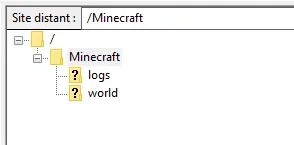
- Go to the Minecraft folder
- In this folder, you need to drag and drop your world folder
- Return to your manager
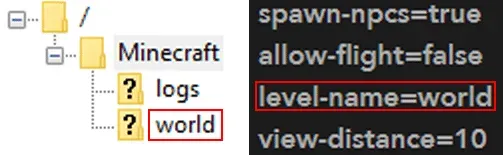
- In the "Configuration" tab, check that the level-name line matches the name of the file you just added to your FTP
You now know how to import a custom map or a map downloaded from the internet to your Nitroserv server!
Check out our Minecraft offer & join us on our discord!


