


 Minecraft
If you want to play with your friends on Minecraft: Bedrock (on console for example) while you are on your computer with Minecraft: Java, it's possible with the GeyserMC plugin. The principle is to combine the Java version with the Bedrock version.
For this installation example, we will install GeyserMC with Spigot or Paper.
You can download Geyser via this link: https://geysermc.org/download. We therefore take the Spigot / Paper version.
The downloaded file is in .jar. To add our .jar to our server, you need to connect to your FTP, if you don't know how to do it, here is this guide: https://www.nitroserv.com/guides/utiliser-le-transfert-ftp
Once connected to our remote server, we have access to the Minecraft folder of our server, we click on it, if the plugins folder does not exist, we create it. We name it plugins!
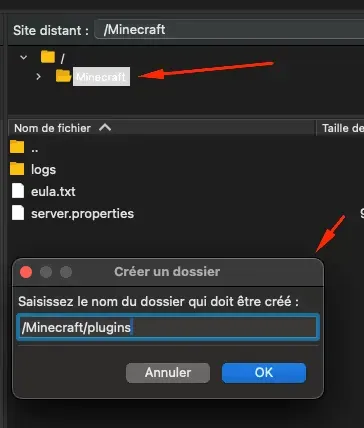
Once this folder is created, we can access it and move the .jar file we downloaded earlier into it. This may take some time, depending on the size of the file. Just after the file is transferred, we restart our server via the manager.
Once the file is transferred and the server is properly restarted, we return to our FTP, then navigate to plugins/Geyser-Spigot/config.yml, and open this file in question. Don't forget to refresh your FTP software if you don't see the files!
Right here, we will change the port, there is a default one but it will need to be changed. For example, my Java server has port 26465. On Nitroserv, the range of allowed ports is between +20 and +50. For the example, I will do +30 on my port, which equals 26495.

We save, normally our FTP software will ask for confirmation. The server must be restarted after this step.
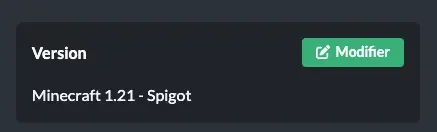
Don't forget to set your server to the correct version (Spigot or Paper). The server must be restarted if the version change has not already been made.
On your manager, you can enter the command /plugins and see if your installation has been successfully taken into account.
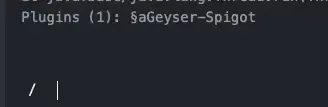
There you go! Your GeyserMC plugin is installed, note that on a Java version, you must connect with your server's IP address and your base port (the one noted on the manager). On the Bedrock version, you must connect with the IP address as well but you must enter the modified port we added above (26495 in the example above). If your Java server address is 127.0.0.1:26465, Bedrock players must enter the address 127.0.0.1:26495.
In case of an error requesting a Java version on the account, you must add the Floodgate plugin which you can find here: https://geysermc.org/download?project=floodgate
Restart your server and it will be fine.


