 Palworld
Customize your Palworld server without touching the configuration file
Palworld allows you to modify a huge number of things: incubation speed, XP, harvesting, bases, damage, death penalty, PvP… basically, pretty much everything you need to adapt your server to your group.
The slight problem is that the game's original configuration looks like this:
OptionSettings=(Difficulty=None,DayTimeSpeedRate=1.000000,NightTimeSpeedRate=1.000000,ExpRate=1.000000...)
Basically: an unreadable line of code as long as a Monday.
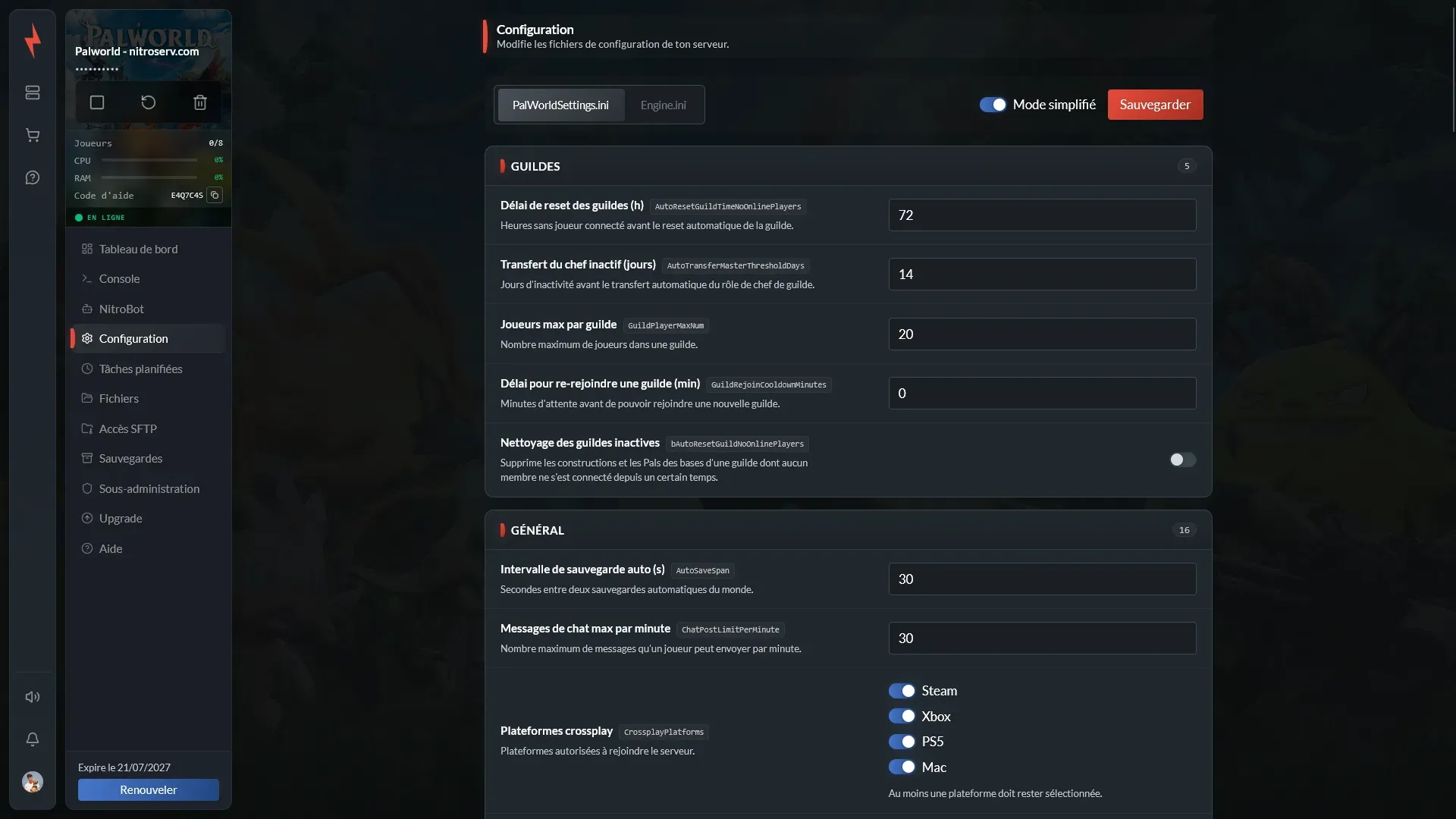
In the nitroserv Manager, we've transformed all of that into a clear, translated interface organized by categories. You modify a value, you save, you restart your server, done.
Quick summary
To configure your Palworld server:
- open your server from the nitroserv Manager ;
- click on Configuration ;
- select
PalWorldSettings.ini; - leave simplified mode enabled ;
- modify the settings you're interested in ;
- click on Save ;
- restart your server.
That's it. No need to search for an option in the middle of an endless configuration line (or sacrifice a comma to the god of .ini files).
Modify a setting from the nitroserv Manager
Each parameter in simplified mode displays:
- its name in English ;
- its technical name in
PalWorldSettings.ini; - an explanation of its effect ;
- its current value.
Toggles are used to enable or disable a feature. Fields allow you to modify a duration, a limit, or a multiplier.
For many multipliers, 1 corresponds to the normal game value:
2generally doubles the effect ;0.5generally divides it by two.
Still read the setting description before modifying its value: increasing a multiplier doesn't always make the game more generous.
Degradation set to 2, for example, might simply degrade items twice as fast (that would be too simple otherwise).

The most frequently modified settings
For a game between friends, players generally start by adjusting:
- experience rate ;
- harvest yield ;
- Pal capture rate ;
- egg incubation time ;
- hunger and stamina ;
- death penalty ;
- number of bases per guild ;
- number of worker Pals ;
- building deterioration ;
- day and night speed.
You can start with normal values, then adapt the server as you go. It's often simpler than modifying 40 parameters before you've even caught your first Lamball.
Save and apply changes
Once you're done with your settings, click Save at the top of the page.
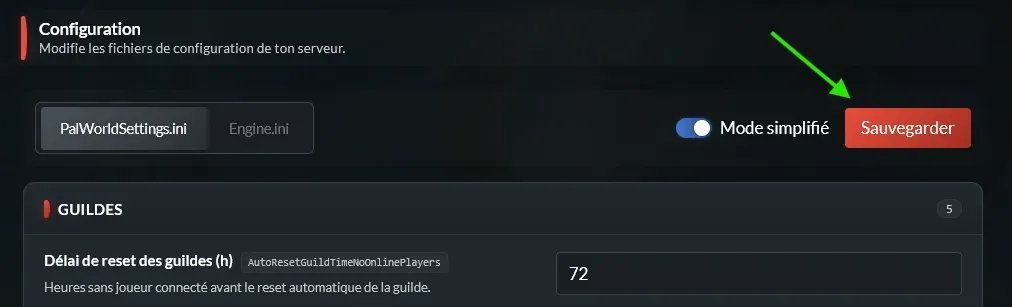
Then restart your server to apply the new values.
For a major change, the cleanest approach is to:
- save your world ;
- stop the server ;
- modify the parameters ;
- click on Save ;
- restart the server.
Also avoid changing dozens of settings at once. By proceeding gradually, you'll be able to more easily identify the cause if something doesn't work as expected.
Verify that the changes work
After the restart, open the Console and wait for the server to finish launching.
You can then join your game and test the modified parameter:
- gain some XP after changing its multiplier ;
- start an incubation after reducing its duration ;
- check the number of available bases ;
- test the death penalty with three berries rather than your best equipment (free advice) ;
- see if raids or fast travel match your new rules.
And in detail: what are the different categories for?
You already have everything you need to configure your server. The rest is mainly to understand how the settings are organized and where to find the option you're looking for (and to do a bit of SEO while we're at it, let's be honest).
General
The General category brings together the major rules of the world and server:
- day and night speed ;
- automatic backups ;
- crossplay ;
- fast travel ;
- raids ;
- drops and meteorites ;
- login messages ;
- spawn point ;
- player display.
This is generally where you'll find options that modify the overall functioning of your game.
Guilds
This section allows you to set:
- maximum number of players per guild ;
- transfer of guild leader role ;
- delay to join a new guild ;
- cleanup of inactive guilds ;
- duration before their deletion.
Be careful with automatic cleanup: depending on your settings, an inactive guild can lose its bases, buildings, and Pals (returning from vacation could be quite brutal).
Bases and construction
You can modify:
- number of bases per guild ;
- number of worker Pals per camp ;
- damage and hit points of buildings ;
- their deterioration ;
- construction limits ;
- lifespan of items on the ground ;
- areas forbidden for construction.
Strongly increasing the number of bases, workers, or buildings can strain the server. So increase values gradually, especially if multiple guilds are present.
Multipliers
This section includes notably:
- experience rate ;
- harvest yield ;
- enemy loot ;
- resource respawning ;
- equipment wear ;
- item weight ;
- work speed ;
- item degradation.
This is the ideal section to speed up a game, reduce farming, or create much longer progression.
Difficulty and death
You can choose:
- what a player loses on death ;
- if hardcore mode is active ;
- if a character can be recreated in hardcore ;
- if team Pals are lost ;
- if inactive players suffer a penalty.
Think carefully before enabling the most severe options on a public server. Losing items is a game rule, losing your best Pals without being warned quickly becomes a diplomatic incident.
Pals
This category allows you to notably modify:
- capture rate ;
- damage dealt and received ;
- regeneration ;
- hunger and stamina ;
- ranch production ;
- incubation time ;
- number of wild Pals.
The number of Pals present in the world and in bases can impact performance. Again, there's no need to immediately set all values to maximum "to test".
Players
You can adjust:
- damage dealt and received ;
- health regeneration ;
- recovery during sleep ;
- hunger ;
- stamina consumption.
A few modifications are enough to create a very accessible game… or make your group regret asking for more difficulty.
Randomizer
The randomizer allows you to shuffle Pal spawns.
You can choose to:
- disable it ;
- shuffle spawns within regions ;
- make Pals completely random ;
- also randomize their levels.
It's a good option to rediscover the game when your group already knows the position of every Pal by heart.
Voice chat
This category allows you to:
- enable proximity voice chat ;
- set the distance at which a voice is heard normally ;
- define the distance at which it becomes inaudible.
Particularly useful for community, RP, or PvP servers (and to hear someone panic before you even see what's chasing them).
PvP
You can manage:
- PvP mode ;
- damage between players ;
- friendly fire ;
- loot recovery from deaths of other guilds.
Before enabling PvP, also check the death penalty, building damage, fast travel, and guild rules. All these options work together and greatly change the server balance.
PalWorldSettings.ini or Engine.ini ?
In almost all cases, you should use PalWorldSettings.ini.
This is the file that contains rules related to gameplay, players, Pals, bases, guilds, and difficulty.
Engine.ini is more about the technical functioning of the engine. Avoid modifying it without following a specific guide or a support recommendation (that magic setting found in a Reddit comment can wait).
My settings aren't applying
If a modification seems to be ignored, verify that:
- you actually clicked Save ;
- the server was restarted ;
- you modified
PalWorldSettings.ini; - the entered value is valid ;
- the option doesn't depend on another parameter ;
- the feature is available in the current game version.
In case of doubt, restore the old value, save, then restart your server.
__
Need help?
If you don't know what value to choose or if your server won't start after a modification, we're available on our Discord or via our Twitter account !
You can also contact us directly via ticket from your manager.
Remember to specify the parameters you modified and, if possible, send us the last lines of the console. That will help us identify the problem much faster.