


 Valheim
Time required: 3 minutes.
How to be an admin on your Valheim server
- Access your FTP Go to .config/unity3d/IronGate/Valheim (if the folder is not visible you need to show hidden folders in FileZilla or Cyberduck)
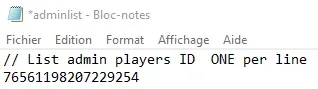
- Download the adminlist.txt file Edit the adminlist.txt file with a text editor (notepad, for example)
- Write your steamID64
- Write your steamID64, one per line if there are multiple admins (Retrievable on steamid.io or directly in-game by pressing F2)
- Upload the file to your server Upload the modified "adminlist" file via FTP to your server
- Restart your server Then simply restart the server to apply the changes
For your information, cheat commands are not yet available on servers.
Check out our Valheim offer & join us on our discord!


