


 Minecraft
If you want to install a plugin on your Minecraft server, it's possible and quick with Nitroserv!
To provide an installation example, I will install the WorldEdit plugin with Bukkit. If you have another plugin or are using Bukkit, Spigot, or Paper, the principle remains the same.
First, I download my plugin. The plugin file is in .jar format, and we will transfer it to our server.
In the File tab, we can see the latest available versions. Since the version I need is the latest, I can directly "Download Latest File"; otherwise, you can check the list of different versions in the files and download the version that suits you.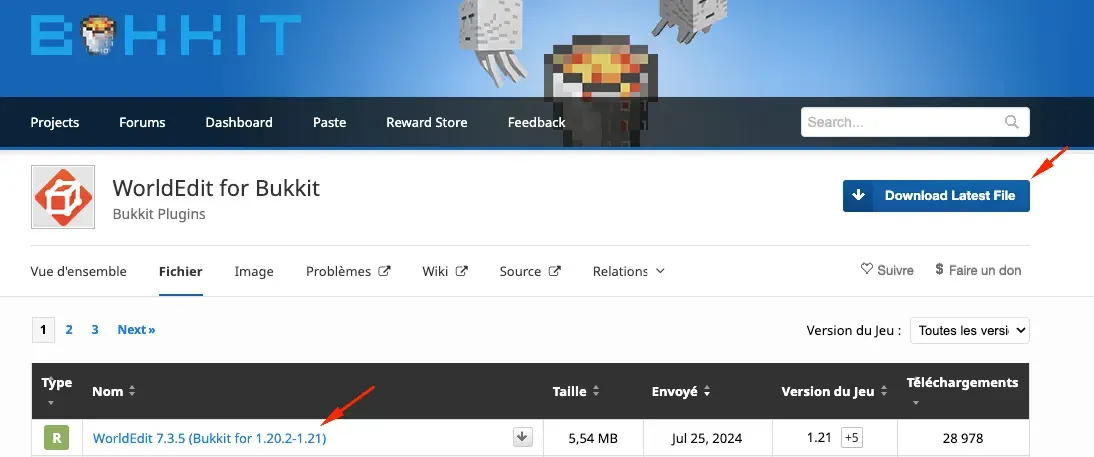
To add our .jar to our server, you need to connect to your FTP. If you don't know how to do this, you can follow this guide: https://www.nitroserv.com/guides/utiliser-le-transfert-ftp
Once connected to our remote server, we have access to the Minecraft folder of our server. We click on it, and if the plugins folder does not exist, we create it. We name it plugins!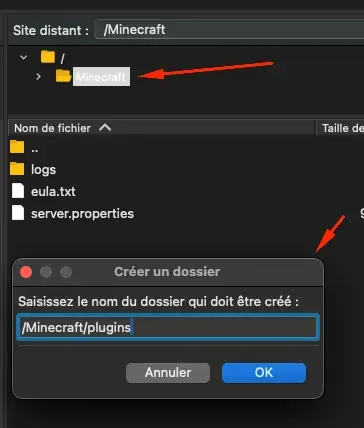
Once this folder is created, we can access it and move the .jar file we downloaded earlier into it. This may take some time, depending on the file size.
Go to our manager, select the correct game version, always with Bukkit for this example.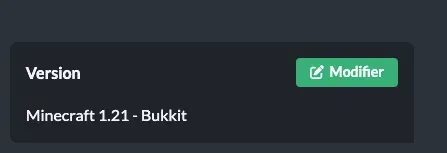
We can now restart our server on our manager. To check that the plugin is correctly recognized, simply enter the /plugins command in the console, and if everything is fine, it will display the correct plugin.
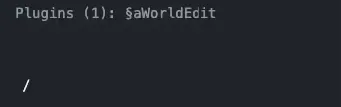
And there you go, your server has its brand new functional plugin!


